
Auto Farm
280+ mobs a minute.
Human-like combat, automatic map movement, and the skills you bind keep Mavis farming around the clock.
Mavis farms around the clock, solves every Rune and Lie Detector, and keeps up with potions and dailies. Every class, one license.
Farming, checks, upkeep and dailies run on their own, and your phone keeps you in control from anywhere.
Auto Farm
Human-like combat, automatic map movement, and the skills you bind keep Mavis farming around the clock.
Auto Solve
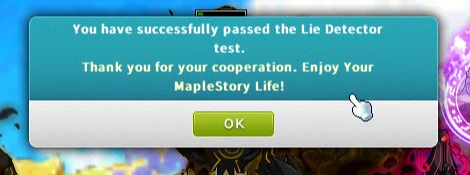
A 100% Lie Detector solve rate: no failed tests, no jail. Every Rune type too, spinning arrows included, then straight back to farming.
Auto Care
HP, MP, Monster Park, daily quests, treasure chests, and Sol Erda conversion run automatically.
Remote Control
Live EXP per hour, meso, level ETA and screenshots in Discord or Telegram. Start, stop, head to town, change channel or switch character with a tap.
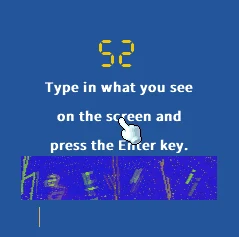
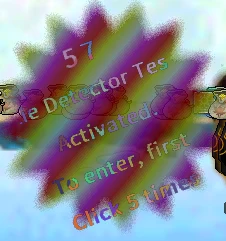
Every official Lie Detector is answered on its own before the timer runs out. No test is ever failed, so your character never sees jail and never stops farming. These are real Mavis runs, not mock-ups.
Set up in a minute. Smart Bind reads the keyboard you already play with, so there is nothing to map by hand.
Choose your class and save a profile. Every supported class is already unlocked.
Open Keyboard Shortcuts in MapleStory, then click Smart Bind in Mavis. Your matching skill keys are imported.
Check your bindings, add any missing keys, and click Start. Mavis handles the map and farming.
Your profiles and settings are saved to your license key, not to one computer.
Changes on either PC sync to the other. One key runs one session at a time. To farm on two PCs at once, add a second key.
Every plan includes every Mavis feature and one session, on any PC. On Monthly and 3 Months, add a key for each extra session.
Loading current Mavis pricing.
Every plan comes with every class, the full feature set and one session. Anything else, just ask.
Yes. Every class is included, so you can switch anytime without buying anything new.
Mavis reads your screen from screenshots and plays using the same keystrokes you would press yourself.
One click to import your skill keys. Quick, hassle-free setup so you can get straight to farming.
Class-aware farming and movement, every Rune and Lie Detector (a 100% LD solve rate, so no jail), care and recovery, channel changes, daily content, and remote actions.
Yes. Your key works on any PC, one session at a time. Start Mavis on another PC and it takes over, with your setup synced. To run two at once, add a session on Monthly or 3 Months.
Your Discord account ties your purchases, renewals, license access, and support to you. Sign-in uses OAuth, and Mavis never asks for your password or token.
Checkout confirms your payment automatically and activates access as soon as it clears. If confirmation takes a moment, keep your invoice open. You do not need to pay again.
Top up credits, then turn on auto-renew for a key in Account. Shortly before the key expires, Mavis renews it from your credits at the current price. It's off until you turn it on, and you can turn it off anytime.

Smart Bind your keys, press Start, and let Mavis keep grinding while you get on with your day.


